
Water Damage Restoration Landing Pages: A Call-First Blueprint
- Landing Page Guides
- 6 min read
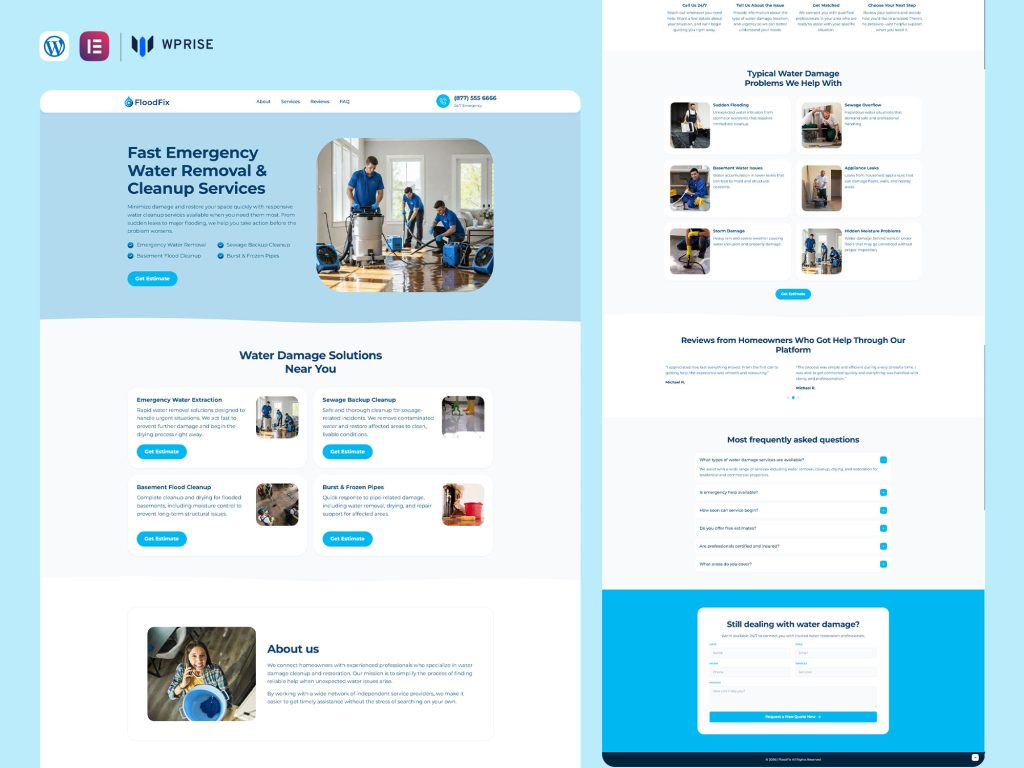
A homeowner looking for water damage help needs to establish three things quickly: whether you cover the property, whether someone will answer, and what happens after contact. A water damage restoration landing page should make those decisions easier before asking the visitor to read a company history.
This guide is for restoration businesses and the agencies building their WordPress pages. It explains how to separate urgent calls from routine enquiries, present a credible service scope, and adapt WPRise’s FloodFix or RestoreX templates to the way the business actually operates.
Choose the enquiry you want the page to handle
Start with one campaign brief. “Water damage restoration” can include a recently discovered leak, an ongoing cleanup job, a request for a property assessment, or research by a building manager. Those visitors do not all need the same next step.
| Visitor situation | Page emphasis | Primary action |
|---|---|---|
| Needs to speak with a team promptly | Actual availability, coverage, contact number | Call the restoration team |
| Wants an assessment after the immediate incident | Assessment process and information to prepare | Request an assessment |
| Manages multiple properties | Commercial scope, coordination and reporting | Discuss a property |
Pick one of these as the main audience. A second contact route is useful, but it should not compete with five unrelated offers. A campaign for water extraction should open with that service, rather than a carousel covering roofing, painting and general construction.
Build the first screen around an answerable phone call
Place the service name, genuine coverage area, a short explanation and the main contact action together. Use a real image of your team or equipment when available. A visitor should not have to scroll past an animated video to find the number.
Example copy to adapt: “Water damage restoration in your local service area. Speak with our team about the property, the affected spaces and the next available assessment.” Replace the general location with the actual area you cover. State round-the-clock availability only when the call is genuinely answered around the clock.
Make the phone number readable as text as well as clickable. Test the link on an actual phone. If the number routes to an answering service, make sure that service knows which campaign generated the call and can explain the next step. A strong button cannot compensate for an unanswered line.
Use a page structure that reduces uncertainty
- Service and contact: explain the main job and display the call option.
- Coverage: name the towns or districts you serve and any operational limits.
- Scope: describe the services your team actually provides, such as assessment, extraction or drying coordination.
- What happens next: explain the contact, assessment and proposal stages without promising an unverified arrival time.
- Evidence: show real project context, team information and credentials you can substantiate.
- Alternative enquiry: provide a short request form for visitors who cannot call.
If you assist with insurer communication, describe the assistance precisely. Do not turn “we can provide documentation” into a promise that a claim will be approved. Keep the page focused on arranging a professional conversation rather than giving technical instructions for handling a damaged property.
Ask for enough information to route the enquiry
A practical first form asks for a name, callback number, property postcode and a brief description. An optional property-type selector can help distinguish homes from commercial sites. Let the visitor say they are unsure about the cause or extent of damage.
Avoid requiring photos, policy documents or a detailed inventory before a person can request contact. If photos are helpful, make them optional and explain how to send them later. A form confirmation should state that the request was received and provide the phone route again for someone who needs to speak to the team.
Configure notifications for the person who actually handles enquiries, not just the website administrator. Submit a test from outside your logged-in WordPress session, then check the inbox, confirmation message and any internal routing. Repeat with an invalid phone number and an empty required field to check the error messages.
Choose a WPRise template by service scope

FloodFix is our water damage restoration Elementor landing page. Its product listing describes emergency contact areas, service highlights, contact forms and customizable testimonial and pricing sections. It is a relevant starting point for a page dedicated to water-related enquiries.
RestoreX covers fire, water and mold restoration. Consider it when the company offers those services and needs a broader restoration presentation. For a water-specific campaign, lead with water-related content and move other services lower on the page.
These are design starting points, not measured conversion comparisons. Review the live previews and current requirements before choosing. Replace every demonstration claim, testimonial and contact detail; remove any service the business does not provide.
Connect the keyword, advertisement and page
Use “water damage restoration” naturally in the title and main heading, followed by the actual location where relevant. Include useful explanations of your services rather than repeating the same phrase in every paragraph. Google’s landing page guidance identifies relevance, usefulness and ease of navigation as parts of the landing page experience.
For organic search, add meaningful local information: operating coverage, genuine projects and how assessment requests are handled. Do not publish a set of identical pages with only the town name changed. Link to related information where it helps the reader, such as your service process or a relevant project page.
Measure answered enquiries, not only button taps
Record form completions and phone-link clicks separately. A phone click is an expression of intent; it does not prove that a call connected or a job was accepted. Keep an operational record of answered calls, service-area matches, assessments arranged and jobs won.
If many enquiries are outside your territory, clarify coverage before changing the button color. If callers ask whether you offer a service you do not provide, tighten the headline and service list. Those changes address the reason a lead was unsuitable.
Questions before launch
Should the form or phone number come first?
For a campaign designed around prompt contact, make the phone route primary if it is reliably staffed. Keep the form available for people who prefer a callback.
Can one page cover fire, water and mold?
It can introduce a multi-service company. A campaign targeting one specific need should give that service a clear, relevant entry point.
Does importing a template finish the setup?
No. Follow the WPRise setup guide, then configure contact routing, replace demo content and test the published mobile page. Start with FloodFix or RestoreX once you have decided which enquiries the page should handle.